
Integrations & tools
Real actions during chat: booking, callbacks, CRM, helpdesk, store orders, alerts, webhooks.
Integrations give the agent real abilities — it checks live availability, books the meeting, opens the ticket — rather than pointing visitors at a link. Connect them on the Integrations tab; keys are stored server-side, never shown again, and never reach the visitor's browser.
Looking for Telegram, SMS, phone, Slack or email? Messaging channels live on the Channels tab — see Channels: embedding & sharing.
Scheduling
- Cal.com — paste your API key and event type ID; the agent offers real free slots and books in the visitor's timezone.
- Calendly — personal access token + the event's booking link (paid Calendly plans).
Team alerts
One incoming-webhook URL — Slack, Discord, Microsoft Teams or Google Chat (format auto-detected). Tick which events ping you: new leads, human-handoff requests, bookings, tickets, idle-chat transcripts. Slack and Discord webhooks are free; Google Chat webhooks require a Google Workspace account (not free @gmail.com), and Microsoft Teams Workflows/webhooks require a paid Microsoft 365 plan.
CRM
- HubSpot (a Service Key — recommended — or a private-app
pat-…token, with thecrm.objects.contacts.readandcrm.objects.contacts.writescopes — these cover the timeline note too), Pipedrive (API token + company domain), or Zoho CRM. The agent saves contacts it naturally collects; lead-form submissions and bookings sync too, each with the conversation context attached as a note on the contact. - Zoho uses OAuth: in Zoho's API console create a Self Client, grant the
ZohoCRM.modules.contacts.ALLscope, and generate a refresh token. Paste the client ID, client secret, refresh token and pick your region (the data centre your Zoho lives in — .com, .eu, .in, …). Contacts are deduplicated on email.
Email marketing
Add a captured contact straight to your mailing list, so a new enquiry can flow into your newsletter or automations. One list per agent — Mailchimp (API key + Audience ID; the key ends in a data centre like -us21), Brevo (API key + numeric List ID), or Klaviyo (private API key + List ID). It fires on the same moment as the CRM sync — a lead form, a booking, or a contact the agent collected. You're responsible for having consent to email the people you add, so only switch it on for a list a new enquiry genuinely belongs to.
Helpdesk
- Zendesk, Freshdesk or Jira — the agent opens a ticket when a visitor's problem needs written follow-up, with their email and a clean description. The visitor is set as the requester/reporter, so your helpdesk's own emails carry your agents' replies back to them. For Jira, use a Jira Service Management project — paste your site, email and API token, then pick your service desk and request type from the dropdowns (Kelma lists them straight from your token, no ID hunting). The visitor is added as a customer and raised as the reporter, so portal/email updates reach them when you comment; a plain Jira Software project key still works but has no customer notifications.
E-commerce
One store per agent. Two abilities: order status, and product recommendations.
- Order status — the agent answers "where's my order?" from live data, and always requires the order number and the checkout email together before revealing anything.
- Product recommendations — when a visitor is looking to buy or asks what you sell for a need ("a gift for a diver"), the agent searches your catalogue and shows real products — image, price, buy link — as tappable cards. It only ever shows live products, never invented ones.
- Shopify — custom-app Admin token with the
read_ordersscope for order status; addread_productstoo if you want product recommendations. - WooCommerce — REST API keys from your WordPress store (read permission covers both orders and products).
Payments
The agent can take a card payment in the chat — a booking deposit or a one-off sale — through your own Stripe account. On the Payments tile, paste a Stripe restricted key (Stripe → Developers → API keys → Create restricted key with Write access to Checkout Sessions), set your currency and a min/max amount, and describe what you sell. When a visitor agrees to pay, the agent shows a secure pay button; they pay on Stripe's own checkout, so no card details ever touch Kelma or your site. You're told the moment it clears (email/alert + a payment.received webhook). The amount is always one you and the visitor agreed, clamped to your min/max — the agent can't invent a figure. Mention payments in your Instructions (e.g. "offer a €50 deposit to hold a booking") so the agent knows when to ask.
Built-in tools
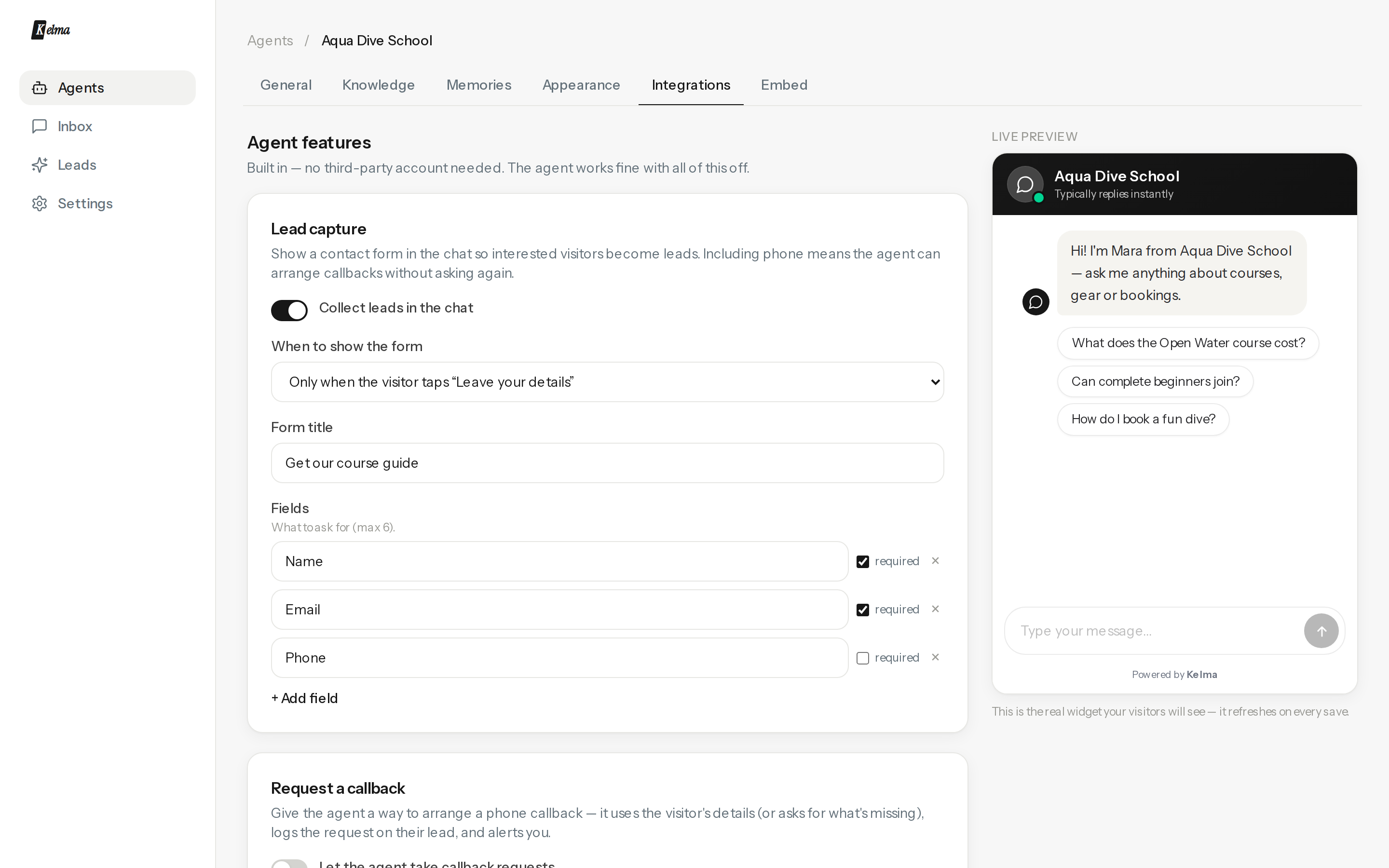
- Lead capture — a native form in the chat; trigger it before the chat, after the first reply, after N messages, or leave it to the agent's judgement. Up to six fields.
- Phone callback — the agent collects a number and preferred time and logs a callback request.
- Human handoff — controls whether the agent may pull a person into the chat live. The agent only offers it when someone can actually take the chat right now: a teammate covering this agent is online (set your status from the Inbox), or you've set a default person to catch handoffs while everyone's offline. Limit it to your team's hours in your timezone; when it's off, outside hours, or nobody can take it, the agent never promises a human will join and offers a callback or ticket instead. Alerts and emails still notify you either way — they just don't, on their own, make the agent promise a live person. Manual takeover from the Inbox always works.
- Email notifications — per-event emails to any address, plus full transcripts of idle conversations.
- Custom actions — define your own tools that call any endpoint you run (see Custom actions). Event webhook POSTs to Zapier/Make/your API when things happen — tick the events you care about: new lead, new conversation, human-handoff request, meeting booked, ticket opened. Each fires a JSON payload
{ event, agent, …, createdAt }. - Your own AI model — point an agent at any OpenAI-compatible endpoint (your own OpenAI/Azure/Together account, or a self-hosted server). Connecting runs a one-token test call, so a wrong URL, key or model id fails the save with the provider's reason instead of breaking the live widget. Inference is billed to your provider account; messages still count towards your Kelma plan.
The agent is explicitly taught it can only act through connected tools — it will never claim it "transferred you" without one.
Every integration adds one or more named chat tools (shown on its connect panel, e.g. book_meeting, create_ticket). You can steer when the agent uses them from your Instructions — see Calling tools from instructions — and try any of them by hand on the agent's Playground tab.