
Channels: embedding & sharing
The chat bubble snippet, inline iframe, public share link, domain allow-list — and messaging channels.
Everything you need is on the Channels tab: your website embed, the public share link, and the messaging channels (Telegram, SMS, phone, Slack, email) all in one place.
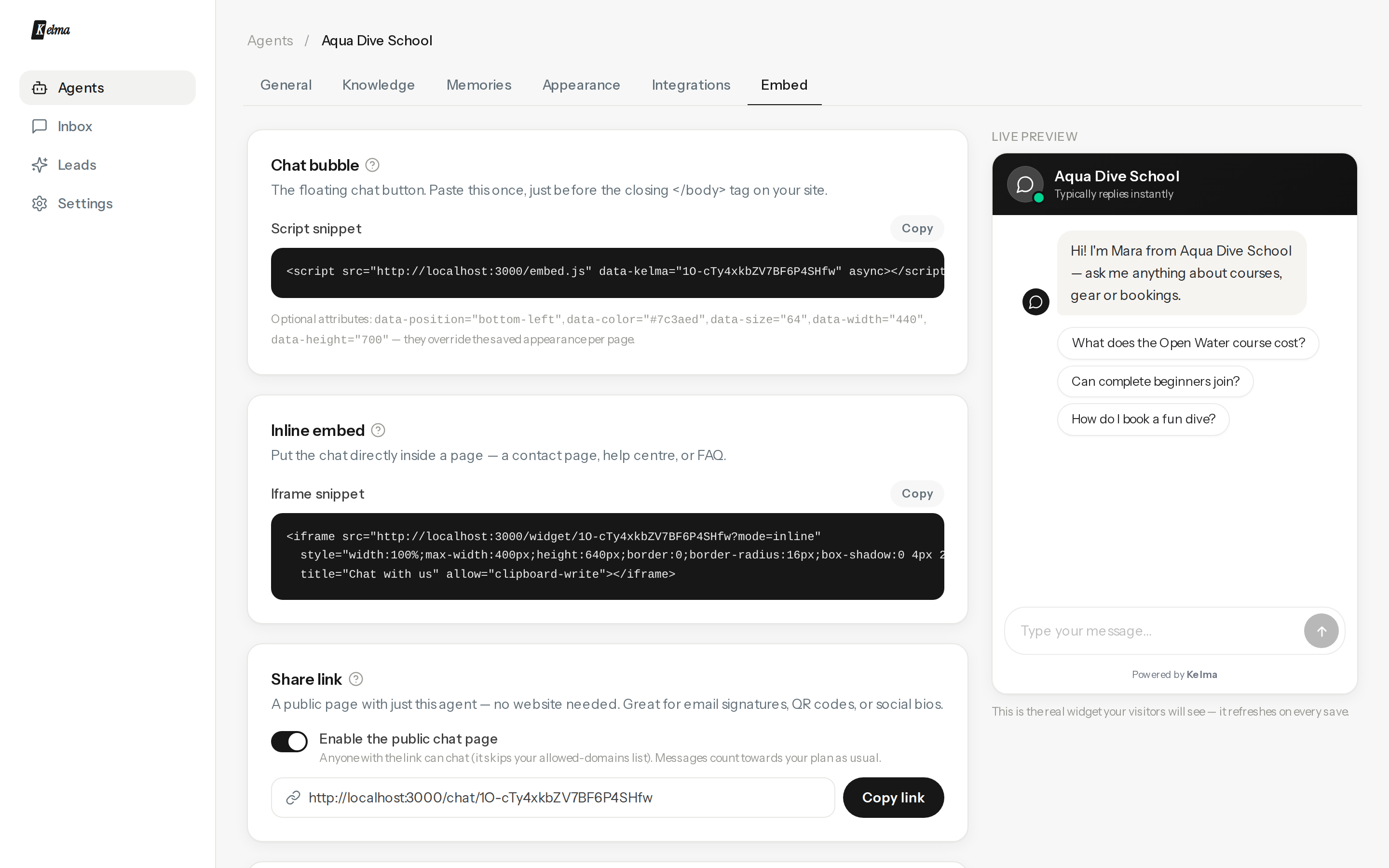
Chat bubble (recommended)
Paste the script once, just before </body>:
<script src="https://kelma.chat/embed.js" data-kelma="YOUR_AGENT_ID" async></script>
Works on any site — WordPress, Shopify, Webflow, plain HTML, single-page apps. Need step-by-step help for your platform? See Add Kelma to your website for guides covering WordPress, Shopify, Wix, Squarespace, Webflow, Google Tag Manager, React, Next.js and plain HTML.
Optional per-page attributes override the saved appearance: data-position="bottom-left", data-color="#7c3aed", data-size="64", data-width="440", data-height="700".
Inline iframe
Put the chat inside a page — a contact page or help centre — with the iframe snippet. It fills whatever container you give it.
Share link
Switch on the public chat page to get a link like kelma.chat/chat/… — the agent as a standalone page, no website needed. Great for email signatures, QR codes and social bios. Anyone with the link can chat, and messages count towards your plan as usual; switch it off any time.
Need it private? Set a password on the share card — visitors enter it once and stay unlocked on that device for 30 days. Changing the password locks everyone out again instantly. Handy for client portals, internal tools, or a chat you're still testing.
Scan-to-chat QR code
Under the website embed, the Scan-to-chat QR code card gives you a printable code that opens the chat on a visitor's phone — no app, no typing a URL. Put it on posters, menus, packaging, receipts, a shop window or a table tent. Download it as PNG (quick use and print shops) or SVG (stays sharp at any size, for large prints).
The code is permanent: it encodes a fixed short link (kelma.chat/q/…) rather than the chat page directly, so once it's printed it keeps working — it won't change if you rename or reconfigure the agent, and you never have to re-print. It's the same for that agent every time.
Allowed domains
By default any site can embed your agent. Add domains (one per line, subdomains included) to restrict it — other sites then get nothing, silently. The share link ignores this list only while you have sharing switched on.
AI visibility
Customers increasingly ask ChatGPT, Perplexity and Google's AI Overviews instead of searching. The AI visibility card on the Channels tab writes a business summary + FAQ from your knowledge base and publishes them as an llms.txt and FAQPage JSON-LD — the two artifacts answer engines read. Press Generate, flip it on, and host the files. Full walkthrough: AI visibility (AEO).
Messaging channels
The same agent — same knowledge, tools and inbox — can answer where your customers already message you. Connect these under Channels → Messaging channels:
- Telegram — the fastest to connect: message @BotFather, send /newbot, paste the token into the Telegram tile — Kelma verifies it and registers the webhook itself. No developer console, no review process.
- Slack — your own team asks the agent inside your workspace: DM the bot or @-mention it in a channel. See the Slack channel guide.
- SMS — the agent answers texts to your Twilio number. See the SMS channel guide.
- Phone — the agent actually answers calls to your Twilio number and holds a spoken conversation, with the transcript in your inbox. See the Phone channel guide.
- Email — connect your own support mailbox (IMAP + SMTP); the agent answers from your address, auto-reply or draft-for-approval. See the Email channel guide.
WhatsApp, Messenger and Instagram are coming soon — they are built and in review with Meta, and unlock for every account the moment it clears.
On Telegram the agent also understands voice notes — they're transcribed automatically and answered like any typed message — and photos, which it reads and reasons about.
Voice input on the widget
When your Kelma instance has speech-to-text configured, the website widget shows a microphone in the message box: the visitor taps it, speaks, and their words are transcribed into the composer to review and send — handy on mobile. It reuses the same transcription as the messaging channels; if speech-to-text isn't set up, the mic simply doesn't appear.